
You can change the background of the frame to an image by double tapping on the photo preview under the frames tab and press "change background"
If you want to change it to a solid color you will first need to make/find a image of the color you want.
To create your own:
If you need any further assistance, please don't hesitate to let us know.
If you want to change it to a solid color you will first need to make/find a image of the color you want.
To create your own:
- Click on the start menu in the bottom left
- Type in "Paint"
- Click on "Microsoft Paint"
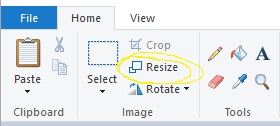
- Press the "resize" button, this is in the "image" section on the top bar.
- Select "pixels" at the top
- Uncheck "maintain aspect ratio"
- Type New Horizontal and Vertical values, (1844x1240 6x4 photos or 620x1844 for filmstrips)
- Press ok
- Select the "Paint bucket" icon
- Select the "change color" option
- Choose a color
- Click/Tap on the white box
- Press "file" in the top right corner of the paint program
- Save as JPEG PICTURE in wherever you would like to save this image
If you need any further assistance, please don't hesitate to let us know.